Invoice without your own company
Invoice without a company.
Keep more.
You can invoice as a private person, without your own company. You do the work. We handle invoicing, salary, tax and employer contributions.
- 4.6 ★ on Google (96 reviews)
- Salary within 1–2 banking days after payment
- FLEX 3.95%, or PRO from SEK 995/mo

How it works
How invoicing without a company works
Three steps. You create an account, create the invoice and get paid.
Create an account
Create your account and fill in your details. It is free and takes a few minutes.
Create the invoice
Enter the client, what you have done and the amount. We review the details, send the invoice and follow up the payment.
Get paid
When the client has paid, we handle tax and employer contributions and pay out your salary. Normally within 1–2 banking days.
Included
You do the work. We handle the administration.
Invoicing is one part. You also skip the bookkeeping, the VAT return and calculating tax and employer contributions yourself. This is included in both FLEX and PRO.
Invoicing and review
Create the invoice with hours, expenses and invoice lines. We review the details before the invoice is sent.
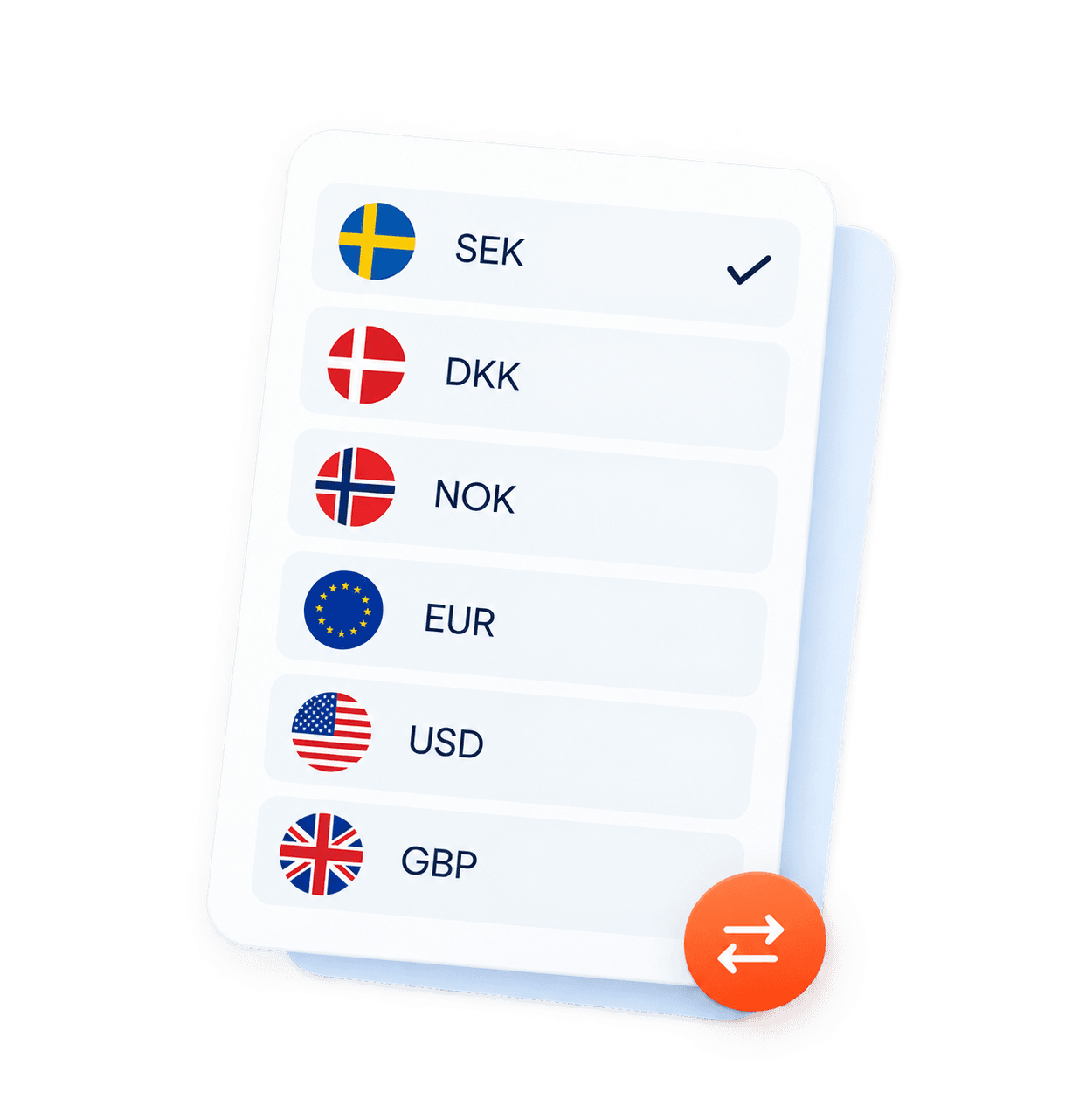
Six currencies
SEK, EUR, USD, GBP, NOK and DKK. EU invoices need the client’s valid VAT number.
Overview of invoices and payments
Follow your invoices, payments and payouts in one place.
Insurance via If
You are covered by insurance according to the terms that apply to your assignment.
Save for occupational pension
Choose how much you want to set aside for occupational pension each month. The pension solution is offered together with SPP.

Expenses, sick pay and certificates
We help with expenses, mileage, reminders, debt collection, sick pay and certificates. Support is people you can talk to.

When does it fit?
When does invoicing without a company fit?
Start with your situation. The same service can fit in several ways.
I have an assignment and need to invoice
You do not need your own company. Create an account, enter the client and the amount. We review the details, send the invoice and follow up the payment.
See how it worksI only invoice now and then
You do not invoice every month, or you want to try freelance life without starting a company. FLEX costs 3.95% per invoice and has no fixed monthly fee.
Read the full processI invoice regularly but want to skip my own company
You skip the bookkeeping and running a company. PRO has a fixed price from SEK 995 per month and 0% per invoice. It usually fits above about SEK 25,000 a month.
Read more about PROI have a client abroad
You can invoice in SEK, EUR, USD, GBP, NOK and DKK. Clients in the EU need a valid VAT number. We help with the VAT handling.
Guide: invoicing abroadPrice
What does it cost to invoice without a company?
FLEX and PRO are two prices for the same service. FLEX suits you if you invoice now and then. PRO suits you if you invoice regularly and want a fixed monthly price.
FLEX
3.95%
per invoice · SEK 0/month
Irregular invoicing, or below SEK 25,000/mo
- The whole service is included
- No monthly fee
- No commitment
- You only pay when you invoice
PRO
SEK 995/mo
per month · 0% invoice fee
For regular invoicing above SEK 25,000/mo
Most popular
- A fixed monthly price regardless of invoice amount
- 0% per invoice
- Unlimited invoices
- 6 or 12-month commitment
Trust
The freedom to freelance. The security of an employer.
When you invoice through WorkNode, we are your employer. You receive salary from us. We handle tax, employer contributions and the reporting, and we are here when you need help.

”WorkNode helped me take my freelancing to the next level. Highly recommend!”
- WorkNode is your employer
- You receive salary from us. We deduct tax and pay employer contributions.
- Insurance via If
- According to the terms that apply to your assignment.
- Salary within 1–2 banking days
- after the client has paid
- We follow up the payment
- Reminders and debt collection if the invoice is not paid on time.
05 Frequently asked questions
Common questions about invoicing without a company
Short answers. Each question can be read on its own.
Getting started
- Can I invoice without my own company?
Yes. You can invoice as a private person through WorkNode, without starting a company. We handle the invoice, the salary, the tax and the employer contributions. You do the work and skip the bookkeeping and the VAT return.
How self-employment works- Do I need F-tax?
No. WorkNode invoices the client under its own F-tax registration. You receive the payment as salary and do not need your own F-tax for those assignments.
Invoice without F-tax- What is self-employment?
Self-employment means you take assignments as a private person and invoice through WorkNode. We are your employer for the assignment and handle salary and employer administration. You do not have to start and run your own company.
Read about self-employment- Invoice without a company, or start your own?
Invoicing without a company often fits when you want to get started quickly, invoice now and then, or skip the bookkeeping. Your own company can fit better if you are building a business for the long term, have large costs, or want to control the company’s finances yourself.
Compare with a sole trader
Price and salary
- What does WorkNode cost?
FLEX costs 3.95% per invoice and has no fixed monthly fee. PRO costs from SEK 995 per month and 0% per invoice. The account is free. You pay when you use the service.
Compare FLEX and PRO- What is the difference between FLEX and PRO?
It is the same service, with two prices. FLEX suits irregular invoicing or amounts below about SEK 25,000 a month. PRO suits regular invoicing and has a fixed monthly price from SEK 995.
See the prices- How do tax and employer contributions work?
We deduct tax from your salary and pay employer contributions. The amounts are reported to the Swedish Tax Agency. You do not have to calculate VAT and employer contributions on the invoice yourself.
Calculate your salary- How much salary do I get?
It depends on the invoice amount excluding VAT, the service fee and employer contributions of 31.42%. The calculator shows an estimated gross salary before preliminary tax.
Calculate your invoice- Can I save for occupational pension?
Yes. You can choose to set aside an amount for occupational pension each month. The pension solution is offered together with SPP. It is a choice, not something that is deducted automatically.
Read about pension
Payout
- When do I get paid?
When the client has paid the invoice. Normally within 1–2 banking days after the payment has arrived and the details match. Salary is paid after the client’s payment.
How payouts work- What if the client does not pay?
We follow up the invoice with reminders and can help with debt collection. Salary is paid when the payment has arrived. WorkNode does not guarantee that the client will pay.
Read about collection and disputes- Can I invoice foreign clients?
Yes, in SEK, EUR, USD, GBP, NOK and DKK. Clients in the EU need a valid VAT number. VAT handling depends on where the client is based.
Guide: invoicing abroad
Insurance
- Am I insured?
You are covered by insurance via If according to the terms that apply to the assignment. Read the terms before you start, so you know what is included.
Read about the insurance

Next step
Create a free account. Invoice when you are ready.
The account is free. With FLEX you pay 3.95% when you invoice. With PRO you pay a fixed price from SEK 995 per month.